

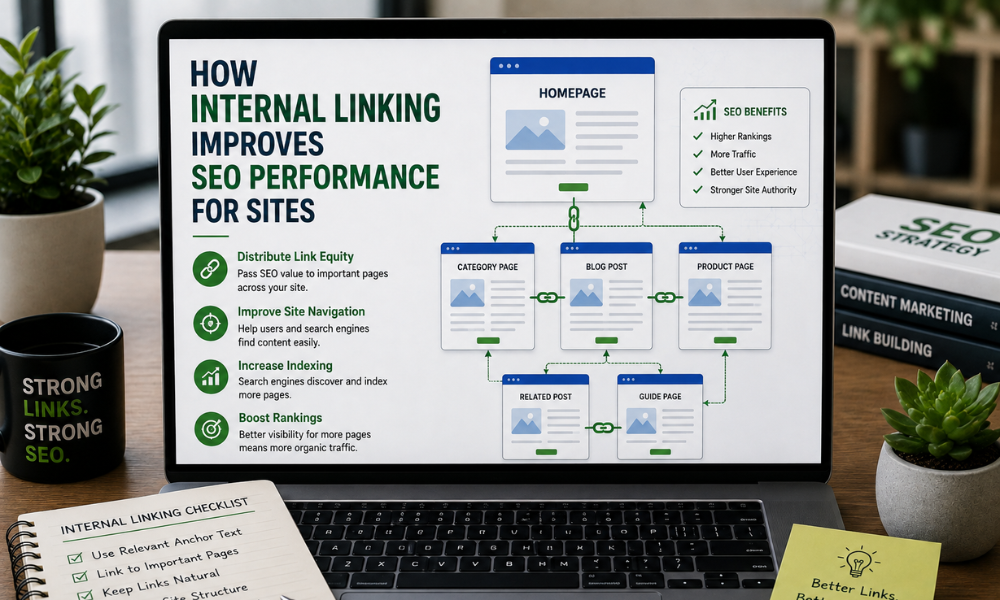
How Internal Linking Improves SEO Performance
A website can have great content, but if important pages are difficult to find, both users and search engines may struggle to navigate it. This is where internal linking becomes an important part of SEO.
Internal links connect one page of a website to another page on the same website. When used properly, they help visitors find related information and help search engines discover and understand the relationship between different pages.
For Vijay SEO, a strong internal linking strategy is an important part of building a well-structured website. It is not simply about adding links to every page. The real value comes from placing relevant links where they naturally help users and support the overall website structure.
What Is Internal Linking?
An internal link is a hyperlink that points from one page on your website to another page on the same domain.
For example, a blog about technical SEO could naturally link to another page explaining website SEO audits. A service page about SEO could link to a related page about keyword research or on-page SEO.
These connections create a path through the website.
Homepage → Service Page → Related Service → Blog → Supporting Blog
This structure allows users and search engines to move between related pages more easily.
Why Is Internal Linking Important for SEO?
Internal linking supports several areas of SEO. It can improve website navigation, help search engines discover pages, establish relationships between content, and direct visitors toward useful information.
However, internal linking should be approached with relevance in mind. Adding links only to increase the number of links on a page does not automatically improve SEO.
The link should make sense in the context of the content.
1. Helps Search Engines Discover Important Pages
Search engines use links to discover and navigate websites.
When an important page has relevant internal links pointing to it, search engine crawlers can find that page more easily while moving through the website.
This can be particularly useful for websites with a large number of pages, such as :
- E-commerce websites
- Service-based websites
- Education websites
- News websites
- Blogs with large content libraries
A clear internal link structure gives search engines more paths through your website.
2. Creates a Better Website Structure
Internal linking helps establish relationships between different pages.
For example, suppose a website has a main page about SEO Services and supporting blogs covering:
- Keyword Research
- On-Page SEO
- Technical SEO
- Local SEO
- Link Building
Relevant internal links can connect these pages to the main service page and to each other where appropriate.
This creates a logical content structure instead of leaving individual articles disconnected.
A well-organized website makes it easier to understand which pages are closely related.
3. Improves User Navigation
Internal links are not only for search engines. They also help visitors.
Imagine a user reading a blog about keyword research and coming across a section about technical SEO. If there is a relevant internal link to a detailed technical SEO guide, the visitor can continue learning without returning to Google to find another resource.
This can help users :
- Find related information
- Explore more pages
- Understand a topic in greater depth
- Move through the website more easily
Good internal linking should feel like a natural next step for the reader.
4. Helps Distribute Internal Link Value
Internal links can help distribute signals and link equity throughout a website.
Pages that receive strong external links may have greater authority or importance within the site's structure. Relevant internal links can help connect those pages with other important sections of the website.
For example, if a website's homepage receives many external links, linking from the homepage to important service pages can help establish those pages as important parts of the website.
This does not mean every page needs dozens of internal links. The focus should be on creating meaningful connections.
5. Supports Page Relevance
The words used in an internal link, known as anchor text, can provide useful context about the destination page.
For example, instead of using :
Click here
you could use :
Learn more about technical SEO
when linking to a relevant technical SEO page.
The second example gives users a clearer idea of what they will find after clicking the link.
Anchor text should remain natural and accurately describe the linked page. Repeating the exact same keyword unnaturally across many links should be avoided.
6. Helps Users Discover More Content
A website may have dozens or hundreds of useful articles that receive little traffic simply because they are difficult to discover.
Internal links can bring those pages into the user's journey.
For example, a blog titled “How to Improve Local SEO” could link to related content about:
- Google Business Profile optimization
- Local keyword research
- Local citations
- Local SEO audits
This creates opportunities for visitors to discover additional content that matches their interests.
7. Can Improve Engagement
When users find relevant content through internal links, they may continue exploring the website instead of leaving after reading a single page.
For example :
Blog → Related Guide → Service Page → Contact Page
This type of journey can be useful when each link provides genuine value.
The goal should not be to force users to visit more pages. Instead, provide useful next steps when additional information is relevant.
Internal Linking Best Practices
A successful internal link strategy requires more than adding links randomly. Follow these practices when optimizing your website.
Link Relevant Pages
Always consider the relationship between the source page and destination page.
If the topics are closely connected, an internal link is more likely to be useful.
Use Descriptive Anchor Text
Use anchor text that clearly explains the destination.
Good:
“Read our guide to technical SEO”
Less useful:
“Click here”
Don't Overuse Internal Links
Adding too many links can make a page difficult to read.
There is no universal number of internal links that every page should contain. The right number depends on the length and purpose of the content.
Add links when they genuinely help the reader.
Link to Important Pages
Review which pages are most valuable to your business and make sure they are properly connected within the website.
These may include:
- Main service pages
- Product pages
- Category pages
- Important guides
- Key landing pages
Fix Broken Internal Links
Broken internal links can create a poor user experience and make website navigation less effective.
Regularly check your website for broken or outdated internal links and update them when necessary.
Review Orphan Pages
An orphan page is a page that has little or no internal links pointing to it.
Important pages should not remain isolated from the rest of the website. Adding relevant internal links can help connect these pages to the broader site structure.
Internal Linking and Content Clusters
Internal linking works particularly well with a topic cluster approach.
A main page can cover a broad topic while supporting blog posts cover specific subtopics.
For example :
Main Topic: SEO
Supporting content:
- Keyword Research
- Technical SEO
- On-Page SEO
- Local SEO
- Content Optimization
- Internal Linking
Relevant internal links can connect these pages and create a clear relationship between the main topic and supporting content.
This approach can make the website easier to navigate and help search engines understand how the content is organized.
How to Create an Effective Internal Linking Strategy
Start by creating a list of your important pages.
Next, review your existing blogs and service pages to identify natural opportunities to link between related topics.
A simple process is :
- Step 1: Identify your important pages.
- Step 2: Group pages by topic.
- Step 3: Find relevant pages that can link to each other.
- Step 4: Write natural and descriptive anchor text.
- Step 5: Add links where they provide value.
- Step 6: Check for broken and outdated links.
- Step 7: Review the structure regularly.
This process can help maintain a cleaner and more useful website architecture as your content grows.
Common Internal Linking Mistakes
Some common mistakes can reduce the effectiveness of an internal linking strategy.
Using Too Many Exact-Match Anchors
Using the same keyword repeatedly as anchor text can make your linking pattern look unnatural.
Linking Irrelevant Pages
A link should have a clear reason to exist. Don't link pages together simply because they are available.
Ignoring Older Content
Older blogs can still provide valuable internal linking opportunities. Review existing content when publishing new pages.
Leaving Important Pages Isolated
Important pages should be easy to reach through relevant internal links.
Using Generic Anchor Text Everywhere
Anchor text such as “click here” provides less context than a descriptive phrase that explains the destination.
Internal linking is a practical part of on-page SEO that can improve how users and search engines navigate a website.
A good internal linking strategy connects related content, supports website structure, helps users discover useful pages, and gives search engines clearer paths through your site.
The goal is not to add as many links as possible. The goal is to create relevant, useful, and natural connections between pages.
As your website grows, regularly reviewing your internal links can help keep your content organized and make important pages easier to discover.
For Vijay SEO, internal linking should be treated as an ongoing part of a broader SEO strategy rather than a one-time task. When links are planned around relevance and user needs, they can contribute to a stronger website structure and a better overall search experience.
Frequently Asked Questions :
Internal linking is the practice of linking one page of a website to another page on the same website. It helps users navigate and helps search engines discover related content.
Internal links can help search engines discover pages, understand content relationships, navigate the website, and distribute internal link value across relevant pages.
There is no fixed number. The number should depend on the page content and how many links are genuinely useful to the reader.
Anchor text is the clickable text used for a hyperlink. Descriptive anchor text can help users understand what they can expect from the linked page.
Internal linking can support SEO by improving website structure, discoverability, and relevance. However, rankings depend on many factors, so internal links alone do not guarantee higher rankings.